
Activate a Mexican voice number
Mexican phone numbers go through a brief legal review before they can take calls. Kronos AI guides you through five short steps and then handles the rest with the carrier. This page walks through every screen you'll see and the documents you'll need to have ready.
Persona física
RESICO, PFAE, freelancer, autónomo. Your Constancia shows your personal name.
Persona moral
S.A. de C.V., S. de R.L., A.C., etc. Your Constancia shows your razón social.
Two documents either way
ID + proof of address. PDF, JPEG, PNG, or WebP. 5 MB cap per file.
3–6 business days
The carrier reviews the bundle. You receive an in-app notification when approved or rejected.
What you need before you start
Have these on hand before opening the form:
- Persona física — your INE or passport, plus a recibo de servicios (luz, agua, internet) or comunicación gubernamental no older than 12 months.
- Persona moral — your Constancia de Situación Fiscal (PDF from the SAT portal), plus a recibo de servicios or comunicación gubernamental no older than 12 months.
- Your full fiscal address as it appears on the comprobante (street, city, state, 5-digit CP).
- A contact email you check often — the carrier sends review notifications there.
Every file must be PDF, JPEG, PNG, or WebP and 5 MB or smaller.
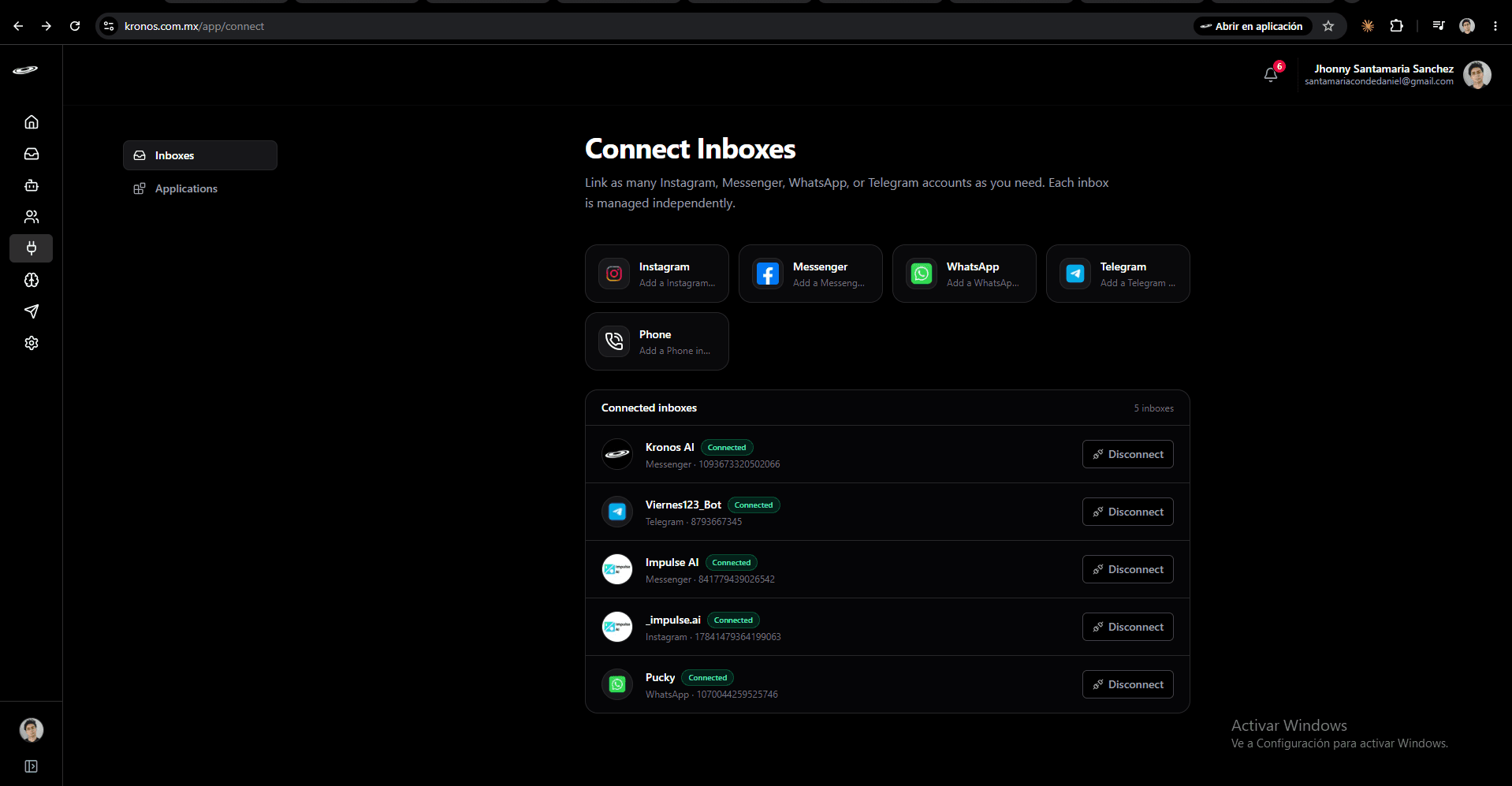
Step 1 — Open Connect and pick Phone
In the app sidebar, go to Connect Inboxes. You'll see the channels you already use plus a Phone tile at the end of the row.
Step 2 — Choose "Connect a new phone number"
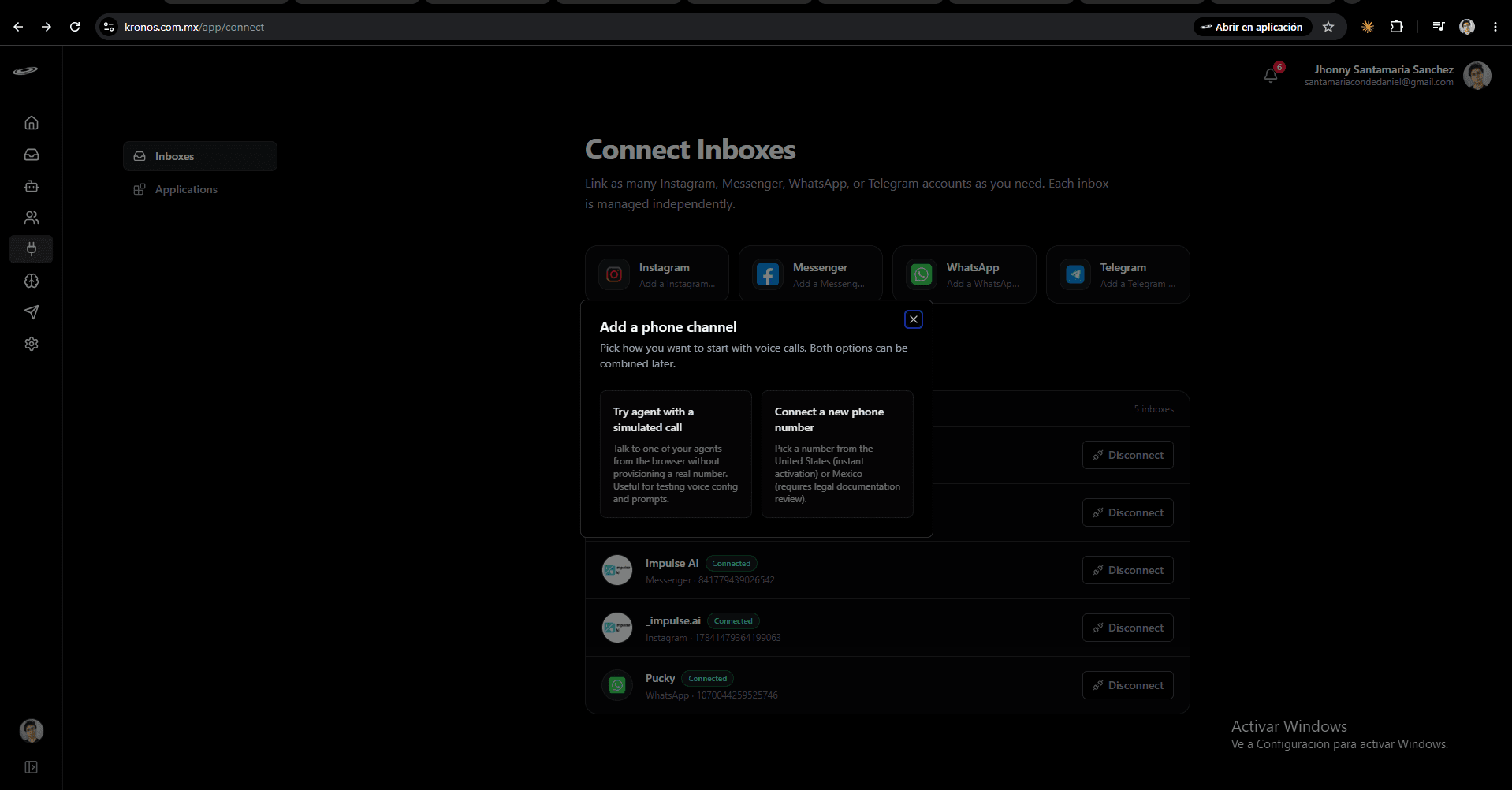
A small dialog opens with two cards:
- Try agent with a simulated call — talk to one of your agents in the browser without provisioning a real number. Useful for testing prompts and voice configuration before you commit.
- Connect a new phone number — pick a real number from the United States (instant) or Mexico (requires legal documentation review).
Step 3 — Pick a Mexican number
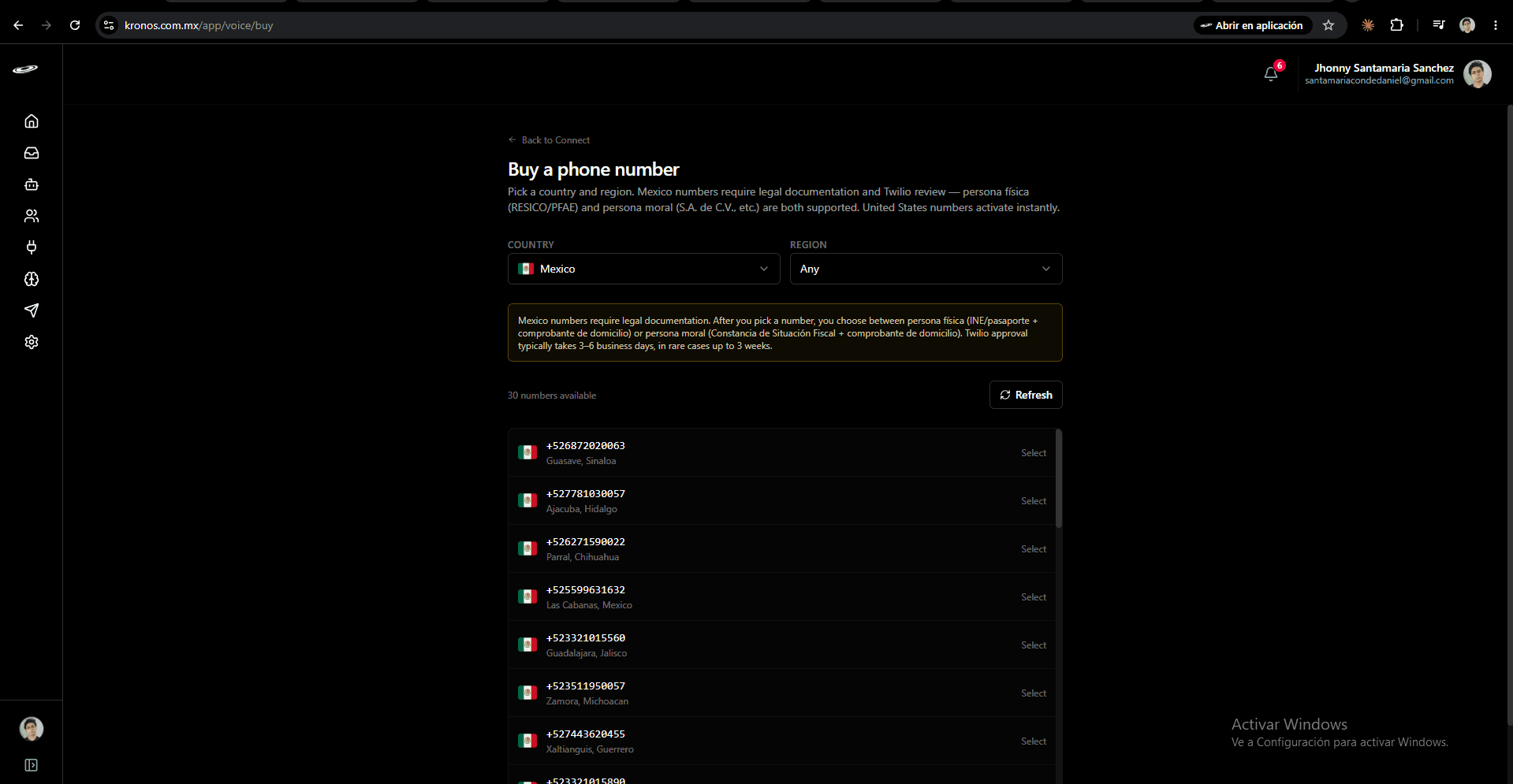
In the Country picker, choose Mexico. Optionally narrow by region; otherwise leave Any to see numbers from anywhere in the country. The list shows up to 30 available numbers — locality and state appear under each one.
Step 4 — Name the inbox and continue
A confirmation modal appears with the number you picked.
- Inbox name — how this voice channel appears in your inbox list. Use something short and descriptive: "Ventas", "Soporte", "Atención a clientes", etc.
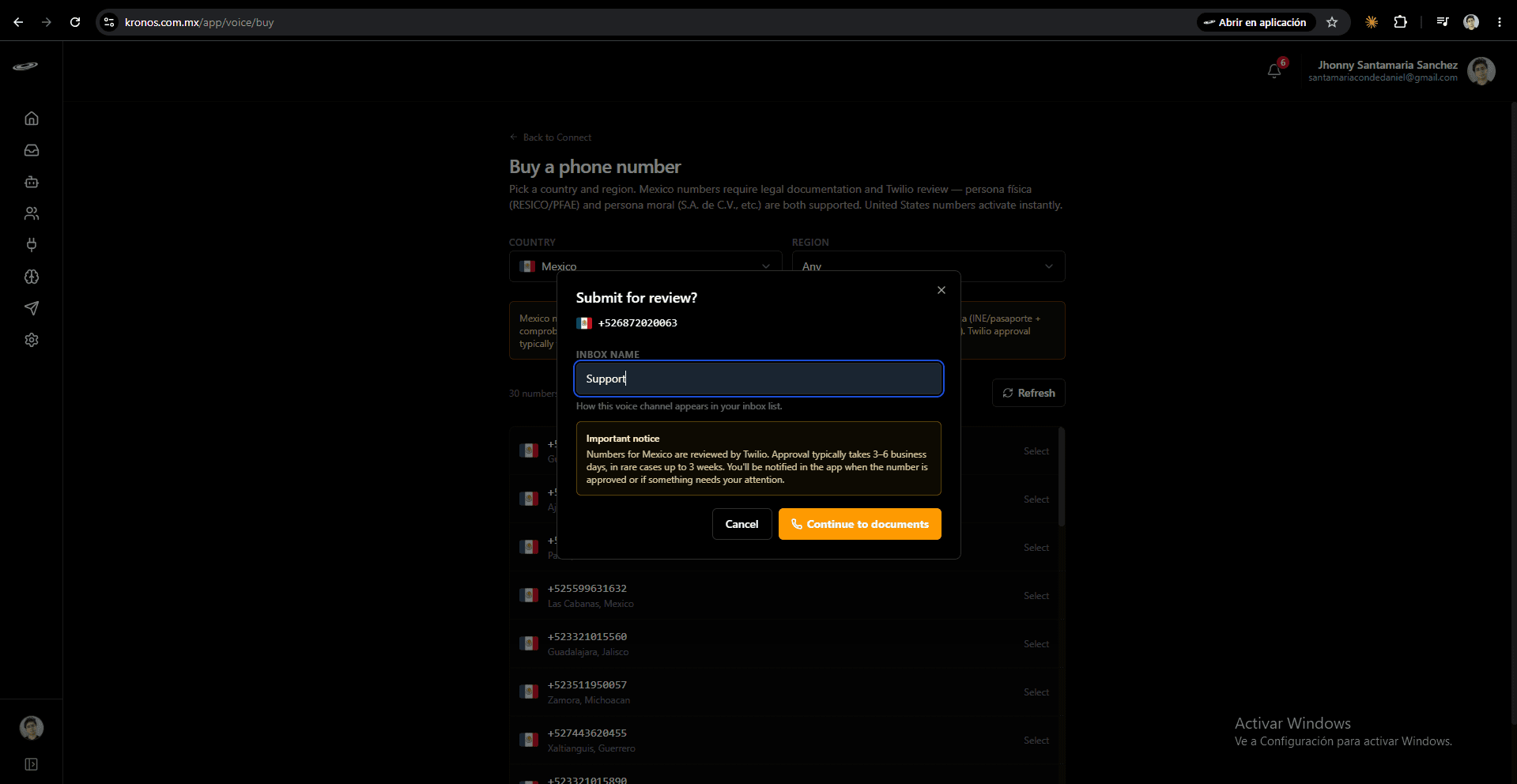
The notice in the modal restates the typical review time (3–6 business days, in rare cases up to 3 weeks).
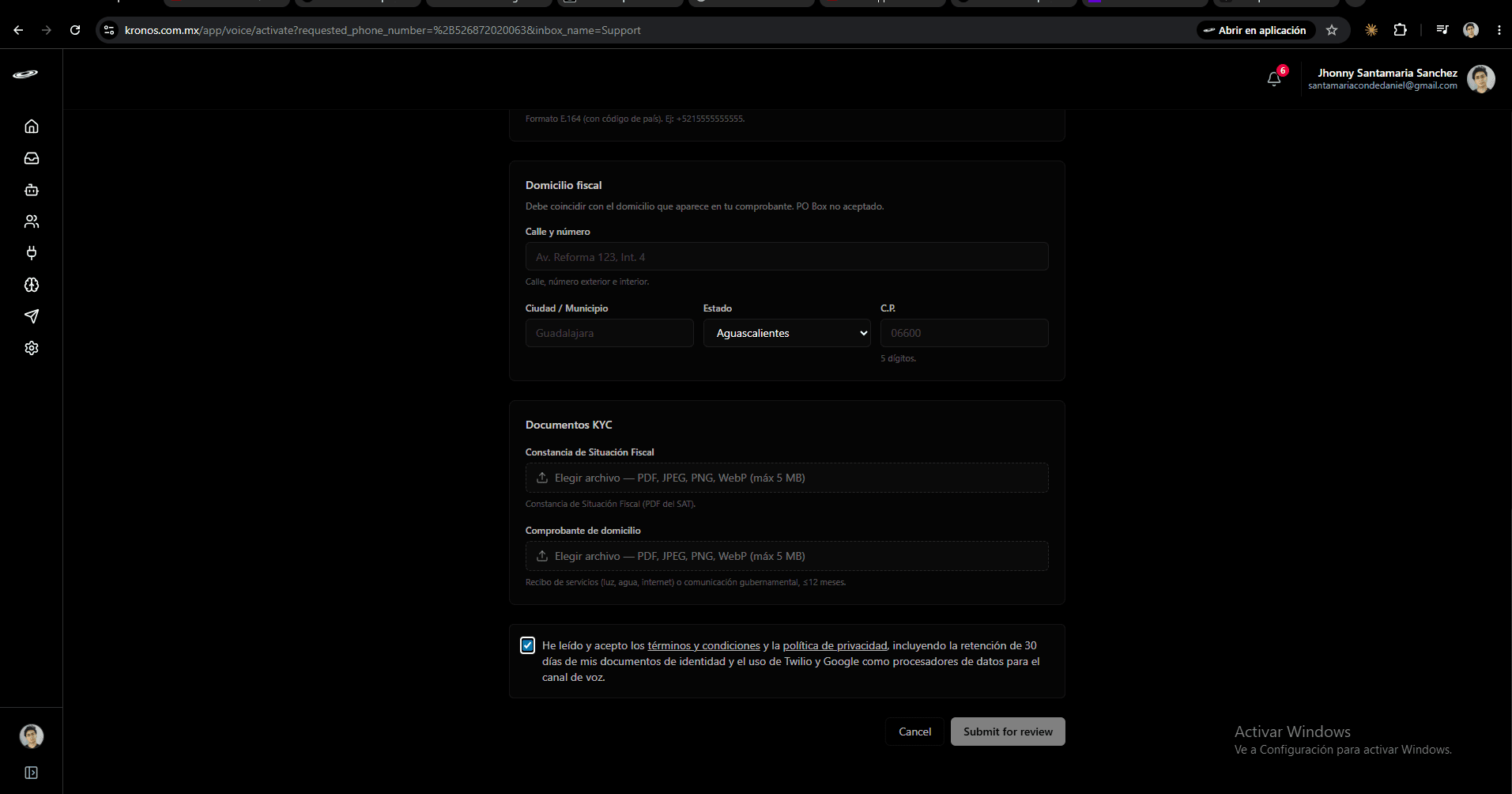
Step 5 — Fill the activation form
This is where you choose your account type and upload the documents.
Tipo de cuenta
Pick Persona moral if your Constancia shows a razón social (S.A. de C.V., S. de R.L., A.C., etc.). Pick Persona física if your Constancia shows your personal name (RESICO, PFAE, freelancer, autónomo).
Identity fields
- Persona física — your Nombre(s) and Apellidos exactly as they appear on the ID document.
- Persona moral — your Razón social exactly as it appears on the Constancia.
Both branches also ask for an inbox name (prefilled from the previous step) and the industry / actividad.
Contact
- Email — the carrier sends review notifications to this address.
- Teléfono — in E.164 format (e.g.
+5215555555555). Internal contact only.
Domicilio fiscal
Type the address that appears on your comprobante:
- Calle y número — street, exterior and interior numbers.
- Ciudad / Municipio — your city or municipio.
- Estado — pick from the dropdown (all 32 Mexican federal entities).
- C.P. — exactly 5 digits.
PO Boxes are not accepted. The address must match the comprobante you upload.
Documentos KYC
Two slots, each capped at 5 MB:
- Persona física → Identificación oficial — INE, pasaporte, u otra identificación oficial vigente.
- Persona moral → Constancia de Situación Fiscal — PDF from the SAT portal.
- Both branches → Comprobante de domicilio — recibo de servicios (luz, agua, internet) or comunicación gubernamental, ≤12 months old.
Accept the terms and submit
Tick the box confirming you've read the Terms and Privacy policy, including the 30-day retention of identity documents. Then click Submit for review at the bottom.
What happens after you submit
- Kronos AI files the bundle with the carrier on your behalf.
- The carrier's regulatory team reviews it. Typical wait: 3–6 business days; in rare cases up to 3 weeks.
- When approved, Kronos AI automatically purchases the exact number you picked and creates the voice inbox. You'll get an in-app notification.
- If something needs your attention — wrong document, name mismatch, expired ID — you'll get a notification with the reason and can submit a corrected activation.
Until approval, the activation appears under /app/voice/activate with its current status: pending, in review, approved, or rejected.
Common errors
- "Razón social is required" — you picked persona moral but left the field empty. Either fill it from your Constancia or switch to persona física.
- "Postal code must be 5 digits" — Mexican CPs are exactly 5 digits.
- "File too large" — files must be 5 MB or smaller. Compress PDFs or scan at lower resolution.
- "This number was just taken by someone else" — another customer picked the same number between your search and click. Go back, refresh, and pick a different one.
Data handling
Your KYC documents live in private storage; only you (and the Kronos AI service that submits to the carrier) can read them. The carrier receives a 30-day signed link to review the documents. After 30 days the link stops resolving — the same day the file is automatically deleted from Kronos AI storage. The activation record itself stays for audit history. When you cancel your subscription, your operational data (agents, conversations, KYC documents) is purged.
Releasing the number
Each account can hold one active voice number at a time. To free the slot — for example to move to a different number or region — release the active number from Settings → Inboxes. After release you can start a new activation following the same five steps.